API
Benefits
Integrating with the Business API provides partners with powerful capabilities for managing their client organizations' presence across the Apple ecosystem. There are several benefits to integrating with the Business API:
-
Publish large amounts of location data – Partners can publish a large body of location information for their client organizations more efficiently with API than through a bulk file.
-
Apply brand identity to locations – Partners can apply their client organizations' branding through cover photos and logos to each location.
-
Reduced publishing time – Publish location data within 15 minutes when it is automatically verified.
-
Access publicly available locations – Partners have access to the published Apple Maps place card through a location
placeCardUrl -
Get notified on publishing state – Partners use Notifications API to get the state of their submissions and are able to take corrective action when errors are reported.
-
Improved data quality – Partners receive synchronous and asynchronous reports from Apple detailing the state of the submitted client organization data.
To be sure partners are not overwriting the brand data published by the client organization for each location: The partner calls Get location to retrieve the latest etag. Compare latest etag to the etag associated with the resource in the partner's system. To update, the incoming data must have the current etag version. The update replaces the existing data.
See Business API > FAQ > Etag.
API and Resources
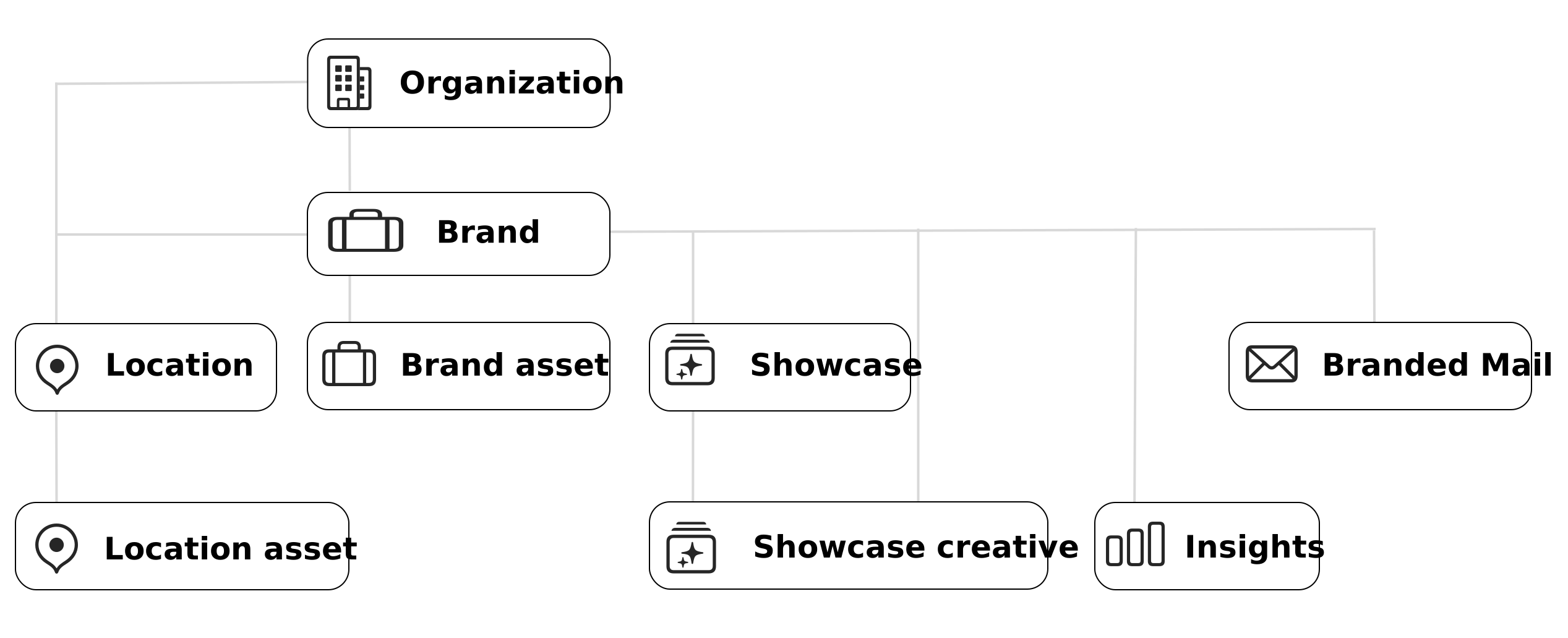
The following diagram shows the relationships and dependencies between the API resources.
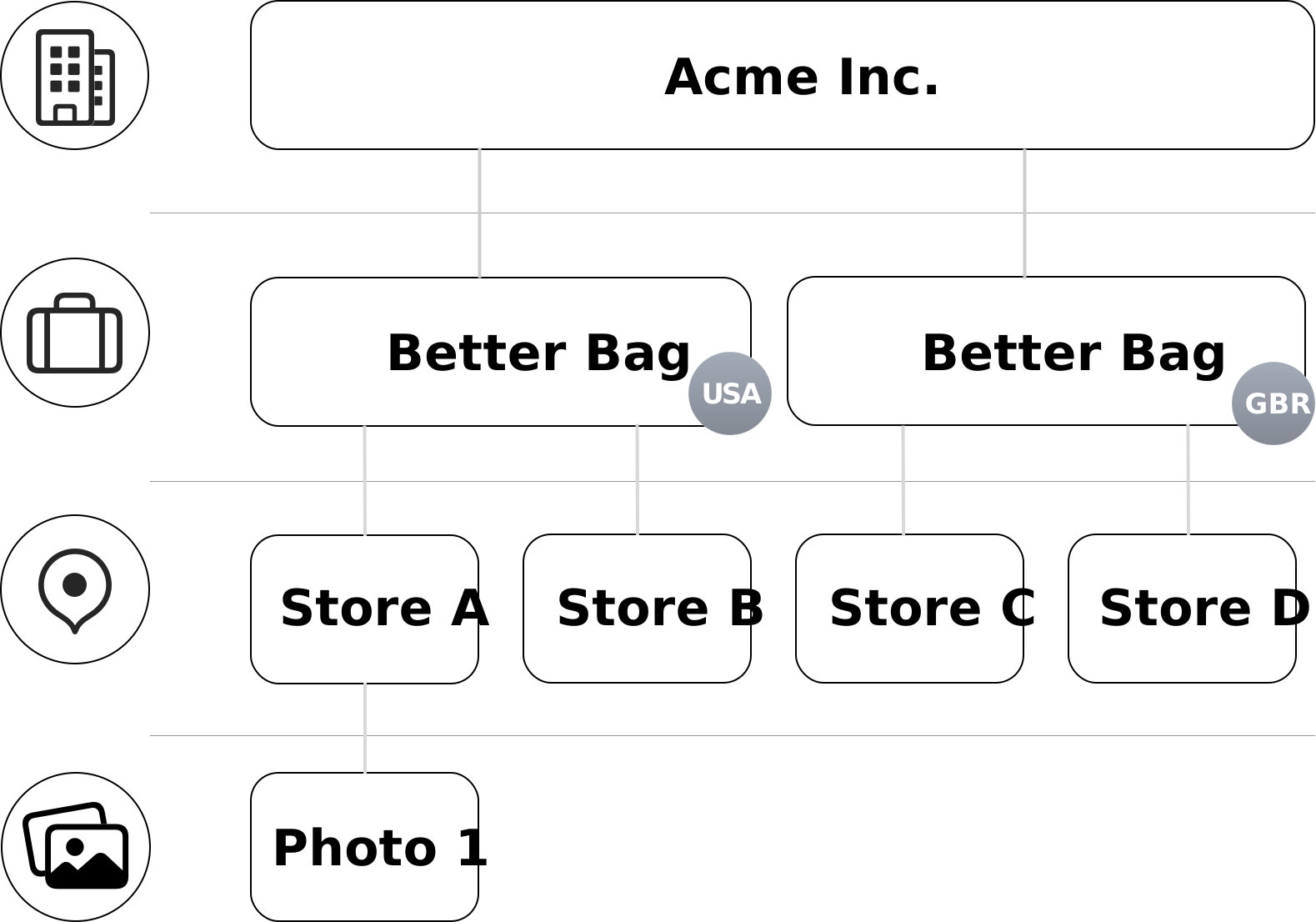
In our example:
-
Acme Inc. is the organization.
-
Acme Inc. organization has Better Bag brands in both the United States and Great Britain.
-
The Better Bag brands have physical locations at Store A, Store B, Store C, and Store D.
Organization
An organization is the top-most resource in Apple Business. The organization must create an account in the Apple Business portal. See the Apple Business User Guide > Intro to Apple Business.
Organizations using Apple Business are referred to as: organizations or client organizations (brands), and partners (agencies).
-
Brand organizations can take advantage of both the Apple Business portal and API through their Apple Business account.
-
Partners create an account in the Apple Business portal and apply for access to the Business API, so they can manage their client organizations data.
Brand
A brand is below the organization in Apple Business. Organizations create one or more brands for each country where they operate.
A brand includes the brand logo and cover photo. By default, these assets are inherited across all brand locations within a country.
To create a brand, provide the required information: country, brand name, brand category, and URL. See Business API > Resource Definitions > brandAssetDetails.
Location
Locations are associated with an Organization. An Organization can have one or many Locations. See Business API > Location.
Required location properties include name, category, location status, and address or display point coordinates.
Recommended properties include hours of operation, phone number, and URL.
Optional properties include quicklinks, gallery photos, good to know attributes, about description, and service hours. See Business API > Resource Definitions > locationDetails.
See also, Apple Business User Guide > Add a location in Apple Business.
Insights
Insights provides metrics about Apple Maps user interactions with locations and showcases. Organizations can use metrics to assess performance of one or more locations. See Business API > Insights > Overview.
After share access is granted, a partner can request reports on behalf of their client organizations and incorporate that information into their own reporting platform only. See Insights.
Insights dashboards are available from the Apple Business portal for partners and client organizations. See Apple Business User Guide > Use Insights for locations in Apple Business.
Data Validation
Business API data is verified automatically within 15 minutes, unless flagged for manual verification. Manual verification is triggered for the following:
-
Location name and address issues – Location is positioned in an unsupported territory, is a duplicate, or there is a change of address.
-
Location description issues – Text in this field has words on the exclusion list.
-
Photo issues – Objectionable content such as images of firearms, nudity, CSAM, or violence.
-
Showcases issues – Inappropriate text or content in showcase copy or image.
See the Apple Business User Guide > Photo and text standards and guidelines for Apple Business to learn about photo design specifications, safety and authenticity requirements, and best practices.
Notifications and Webhooks
As a partner, you are responsible for monitoring the status of the resources you submit. You can do this by polling the Notifications API or by using Webhooks.
Open API Specification
The Business API is specified in a format compliant with the OpenAPI Specification (OAS) standard. From this specification, you can extract a library for most common programming languages. See Business API > Apple Business Open API Specification (OAS).
Apple Category
Customers increasingly search for places in Apple Maps by entering a category such as "Sushi Restaurants". To help Apple Maps users search for and find brands and locations more easily, we provide a category taxonomy.
This taxonomy has increasingly detailed options to enable brands to select more precise categories to represent their core brand.
Benefits of Apple Category
The taxonomy provides:
- A hierarchy that is structured and organizes related concepts.
- "Verticals" that reflect the modern world. For example:
dining,travel_and_leisure,health_care,shopping, and so on. - Up to 5 levels of details, enabling brands to find a more precise category to represent their core brand. For example:
dining.restaurant.european_cuisine.italian_cuisine.central_italian_cuisine.tuscan_cuisine. - Regional specificity. For example:
eastern_european,south_asian,north_indian,northeast_indian, and so on.
Download Apple Categories
The taxonomy is updated periodically. To download the current taxonomy file, see Business API > Categories > Apple Categories.